


Perfect365 Makeup Photo Editor
Perfect365, Inc.
I approached Perfect365 Makeup Photo Editor as a beauty tool rather than a simple filter collection. Its main idea is straightforward: take a portrait or video, experiment with makeup and appearance adjustments, and use the result either as a polished image or as inspiration for your own routine. After spending time with it, I found the app most interesting when I treated it as a visual planning tool, not as a promise that every edit should look natural.
That distinction matters. Beauty editing can be useful for trying a color combination before buying anything, preparing a profile picture, or learning how several makeup elements work together. It can also become frustrating when the preview looks too smooth or when an effect changes the character of a face instead of simply adding makeup. My experience with this app was therefore mixed in a productive way: it offers plenty to explore, but the best results depend on restraint and on checking what I am actually approving before saving or sharing.
What the app is really for
Perfect365, Inc. has positioned this as a free beauty app for Android, with a focus on photo and video editing alongside makeup tutorials. It belongs to the beauty category and is suitable for Everyone, which makes it approachable for casual users who want to experiment without learning a complicated desktop editor. The app has been available since February 19, 2013, and its long presence helps explain why it feels broader than a single-purpose selfie filter.
The basic workflow is easy to understand. I can start with a portrait, look through beauty adjustments, try makeup-oriented changes, and compare the result with the original image. That immediate before-and-after view is important because an effect that looks attractive on its own can seem excessive once I return to the unedited face. I recommend making that comparison regularly rather than waiting until the end.
The app is free to install, while optional in-app purchases range from $0.99 to $19.99 per item. That arrangement makes it possible to test the general experience before spending anything, but it also means I need to pay attention when exploring premium-looking tools or content. I would not begin by assuming every visible option is included. I would first learn which controls fit my needs, then decide whether paying for additional material is worthwhile.
Latest News

Uber Eats Under Pressure: What Happens When Delivery Goes Wrong

How QR & Barcode Scanner Adapts to Android and iOS Innovations

Why Waze Navigation & Live Traffic Is Your Essential Travel Companion

CapCut Mastery: Unleash Hidden Features for Pro-Level Editing

How OS Updates Enhance Roblox Adventures

Teacher Simulator: Exam Time Turns Quick Classroom Judgments into a Repetitive Loop
Its scale is also worth putting into perspective. The app has passed 50 million installs and carries an average rating of 3.6 from around 768 thousand ratings, with roughly 49 thousand written reviews. Those figures suggest a large, varied audience rather than universal satisfaction. I read that combination as a reason to approach it with realistic expectations: many people find value in the concept, but the experience clearly will not suit every editing style or device.
A practical first session
For a first test, I would choose a well-lit portrait with the face looking toward the camera. That gives the makeup controls a better chance of behaving predictably than a dark image, a strong side angle, or a photograph with hair covering the eyes. I would then change one element at a time. Testing lipstick, eye makeup, skin adjustments, and overall styling separately makes it much easier to identify which part improves the image and which part makes it look artificial.
This single-change method is one of the most useful habits I developed with the app. If I apply a complete look immediately, I may like or dislike the result without knowing why. By isolating each adjustment, I can build a lighter edit and keep the parts that actually help. It also makes the app more useful for planning a real makeup look because I can compare color families instead of merely choosing the most dramatic preset.
Gallery
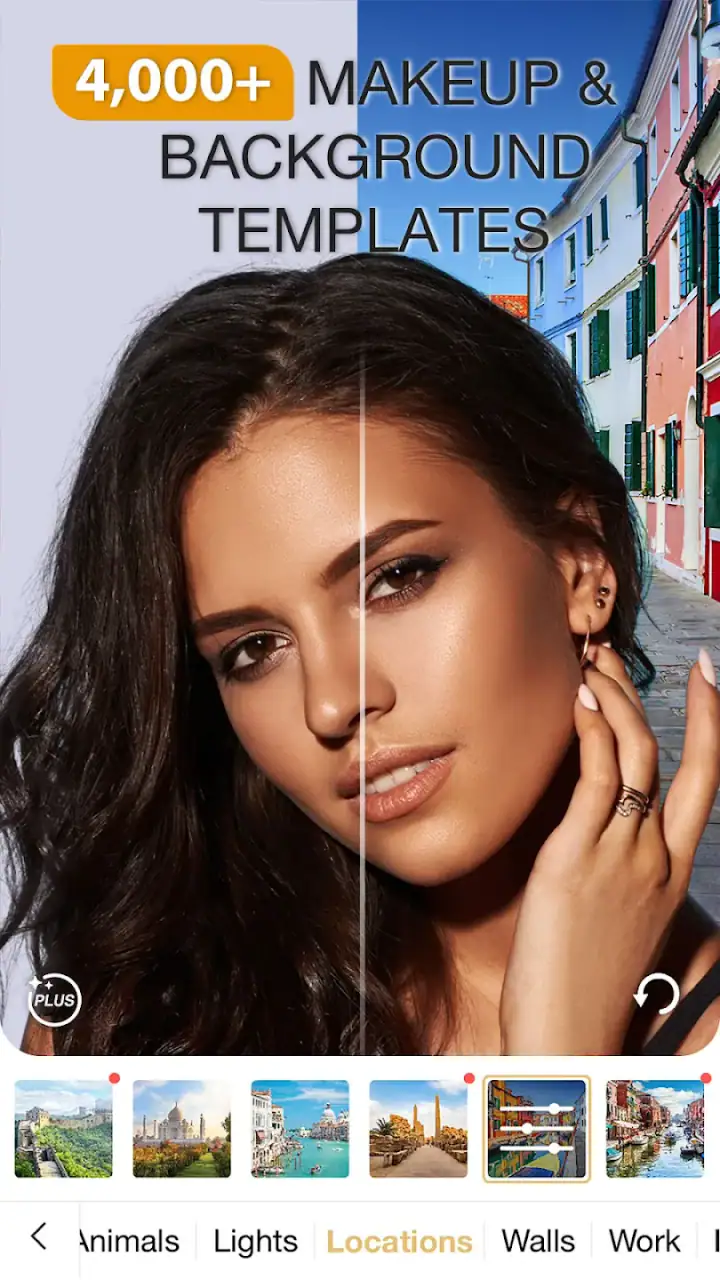
A second useful habit is to test the same look on more than one photograph. A shade that works on a close-up may feel unbalanced in a full portrait, while a smoothing effect that seems subtle on a small screen can become obvious when the image is viewed larger. I would treat the preview as a suggestion, not proof that the final image will look convincing everywhere.
Where the editing experience works best
The strongest use case is quick visual experimentation. If I am deciding whether a warm lip color suits a particular outfit, the app can help me narrow down the direction before I spend time applying makeup. It is also handy for creating a more finished portrait when the original photo is good but the lighting or presentation feels slightly flat.
Video editing adds another practical angle. A still image lets me perfect one frame, but a video asks whether the appearance remains believable while I move, speak, or turn my head. I would use video effects conservatively and preview the entire clip before sharing. An edit that looks fine at the opening frame may become distracting when the face changes position or when the lighting shifts.
The tutorial side can be valuable for someone who wants more than a decorative filter. I see it as most useful when paired with experimentation: watch or study a technique, recreate a similar color balance in the editor, and then decide whether the result feels comfortable in real life. That turns the app from a purely cosmetic shortcut into a small practice space for makeup ideas.
Still, I would not describe it as a replacement for a professional photo editor. Its appeal is speed and beauty-specific experimentation, not detailed control over every part of an image. If I need careful masking, precise retouching, typography, layered composition, or a consistent workflow across a large set of photographs, a dedicated photo editor will usually be the better choice.
Trust begins with visible choices
Because this app works with personal portraits and videos, I pay closer attention to trust than I would with an ordinary color filter. A face is not just another image file for many people. It may show identity, location, family members, or a private moment. My approach is simple: use the narrowest access choices available on the device, review what I am selecting before importing it, and avoid treating a beauty app as a private storage space.
I also prefer to keep the distinction clear between editing and sharing. Creating an image inside the app does not mean I have to publish it, send it to a social network, or make it part of a public profile. I would finish the edit, inspect the available save or share action, and choose deliberately. That small pause protects user agency, especially when experimenting with a portrait that was never intended for public use.
Account controls deserve the same attention. If the app presents any sign-in, profile, or connected-service choice during use, I would decide whether that connection is genuinely needed for my purpose. Someone who only wants to test makeup on a local photo may prefer to avoid unnecessary account commitments. Someone who wants tutorials or a more connected experience may accept them, but should still understand which choices are optional before continuing.
I do not view a free download as permission to stop thinking about privacy. The app’s free price lowers the barrier to trying it, but I would still inspect device prompts, purchase confirmations, and any visible settings related to sharing or account access. The safest workflow is the one where I know what I selected, what I saved, and what I chose to share.
Data-sensitive moments in everyday use
The most sensitive moment is usually the first import. Before choosing a portrait, I would consider whether it includes another person, a child, a workplace badge, a visible address, or anything else that should not leave my private gallery. Even when my goal is harmless, the image may contain more information than the face I want to edit.
Video deserves extra care because it can reveal voices, surroundings, routines, and other people in the background. I would use a short, intentional clip rather than importing a long personal recording simply to test an effect. If I am making a social post, I would create a separate copy or record a controlled sample so the original remains untouched.
Another overlooked moment is the final share screen. Beauty apps often encourage quick movement from preview to publication because the result is designed to be shown. I would slow down there. I would check the recipient, the selected platform, and whether the image is the edited version I actually want to send. This is especially important when comparing several versions, since a polished preview can make it easy to share the wrong file.
Purchases are another point where deliberate action helps. With individual items priced between $0.99 and $19.99, casual tapping can become expensive if I explore without checking the confirmation screen. I would treat every paid option as a separate decision, consider whether I will use it repeatedly, and avoid buying a package merely because it appears while I am trying to close or move past a preview.
How it compares with familiar alternatives
Compared with a standard camera app, Perfect365 is more focused on appearance experimentation. A camera app is usually faster for capturing a natural image and may be preferable when I want minimal processing. This app becomes more useful after the photo exists, especially when I want to compare makeup directions or create a more intentional beauty portrait.
Compared with a general photo editor, it is easier to approach if my goal is specifically makeup and face presentation. I do not need to assemble a retouching workflow from unrelated tools. The trade-off is that I give up some of the precision and broader creative control expected from a full editor. For a single portrait, that convenience can win. For detailed production work, it may feel limiting.
Compared with social media filters, the app offers a more deliberate space for testing. Social filters are convenient when I want an immediate playful effect, but they can encourage decisions based on a live camera moment rather than careful comparison. I prefer Perfect365 when I want to revisit a portrait, adjust the look gradually, or think about whether a style suits me beyond a few seconds on screen.
It is less suitable for someone who wants a completely untouched appearance. Even when I reduce the intensity of an effect, the app’s purpose naturally pushes the image toward a more polished presentation. If authenticity, texture, and accurate color are the priority, I would choose a basic editor with manual exposure and color controls instead.
Who should use it, and who should skip it
I think the app is a good fit for people who enjoy trying makeup colors before applying them, creators who need a quick beauty-oriented portrait workflow, and beginners who want a friendly way to understand how different cosmetic choices change a face. It can also help someone prepare images for a profile or event when the goal is a cleaner, more styled presentation rather than documentary accuracy.
I would be more cautious recommending it to users who dislike subscription-style discovery patterns, do not want optional purchases appearing during exploration, or expect every tool to be free simply because the installation costs nothing. I would also steer away users who need professional retouching precision, extensive privacy controls, or a completely natural result with no beauty-processing character.
Parents and younger users should remember that an Everyone age rating describes broad suitability, not a reason to ignore purchase and sharing settings. I would still review device-level purchase protections and talk through what a portrait app can do before allowing unsupervised use. The same advice applies to any app handling personal photos, regardless of its category.
Device expectations and version details
The current version is 10.15.24 and it requires Android 8.0 or later. That gives the app a reasonably broad Android reach, although actual comfort will depend on the phone, the size of the media, and how demanding the chosen effect is. I would keep some free storage available and close unnecessary apps if previews feel slow, particularly when working with video.
I would also test the app on the device where I plan to finish the work. A look that feels balanced on a large display may appear stronger on a smaller one, and touch adjustments can be harder to judge when the preview is compact. For important portraits, I would save a draft or copy before trying a radically different style so I can return to the earlier version without rebuilding it.
The large install base does not guarantee that every phone will behave identically. Android devices vary widely in camera quality, display calibration, storage speed, and system behavior. My practical advice is to begin with one ordinary photo and one short video, check the complete workflow, and only then commit to a larger project.
My measured way to use the app
I get the best results by setting a purpose before opening the editor. If I want to compare lipstick colors, I focus on that and leave skin adjustments alone. If I am preparing a profile image, I check whether the face still looks like me at normal viewing size. If I am learning from a tutorial, I use the edit to understand the technique rather than copying every visible effect at full strength.
I also keep an original copy outside the editing session. That gives me freedom to experiment without worrying that a strong transformation will replace the photograph I actually wanted to preserve. After editing, I compare the result in three ways: close up, at normal phone size, and beside the original. This catches overly smooth skin, uneven color, and changes that looked acceptable only because I had stared at the edited preview for too long.
One non-obvious trade-off is that realism and convenience are often pulling in opposite directions. Automatic beauty adjustments save time, but they can flatten the details that make a face recognizable. Manual restraint takes longer, yet it usually produces an image I am more comfortable sharing. Another is that a look designed for a still photo may not translate well to video, so I would never assume that a successful portrait edit is automatically suitable for a moving clip.
A final practical insight is to use the app for decisions, not just decoration. I can compare a bold idea with a softer version, decide which color family fits an outfit, and then recreate the chosen direction with real products. That makes the editor useful even when I do not publish the edited image. It becomes a low-risk planning step rather than an endless search for a more dramatic filter.
My cautious verdict
Perfect365 Makeup Photo Editor is worth trying if you want a beauty-focused way to explore makeup looks, refine portraits, and learn through visual comparison. Its free entry point, approachable purpose, and combination of photo, video, and tutorial-oriented tools make it more versatile than a basic selfie filter. I especially like it when I use it slowly, keep adjustments modest, and treat each share or purchase as a conscious choice.
At the same time, I would not recommend it as the universal answer for photo editing. The average rating of 3.6 shows that its broad popularity is not the same as a flawless experience, and the optional purchase range means free access should not be confused with unlimited access. Users who want natural images, professional control, or a tightly privacy-focused workflow may be happier with a simpler camera or a general editor.
My final recommendation is conditional but positive: install it when your goal is to explore beauty presentation rather than preserve a completely untouched photograph. Start with a non-sensitive image, review every visible choice, test one adjustment at a time, and compare the finished result with the original before saving or sharing. Used that way, Perfect365 can be a practical visual sandbox. Used carelessly, it can encourage over-editing and impulsive decisions that have little to do with how the final image really looks.
FAQs for Perfect365 Makeup Photo Editor
What is Perfect365 Makeup Photo Editor used for?
Perfect365 Makeup Photo Editor is a virtual makeup app that allows users to enhance their photos with a variety of makeup tools. It offers features like lipstick, eye shadow, and contouring, along with filters to give your selfies a professional look. It’s suitable for anyone looking to experiment with different makeup styles without the hassle of actual products.
Is Perfect365 free to use?
Perfect365 offers a free version with basic features and a selection of makeup tools. However, for users looking to access more advanced features and a wider range of tools, there is a premium subscription available. The premium version provides an ad-free experience and additional options for more detailed editing.
How user-friendly is Perfect365 for beginners?
Perfect365 is designed with a user-friendly interface, making it accessible to beginners. The app provides easy-to-follow tutorials and intuitive controls, allowing new users to quickly learn how to apply and adjust makeup effects. The straightforward navigation ensures a smooth experience for those unfamiliar with digital editing.
Are the makeup styles customizable in Perfect365?
Yes, Perfect365 offers customizable makeup styles. Users can adjust the intensity and color of makeup elements such as foundation, blush, and eyeliner. This flexibility allows for personalized looks that match individual preferences. The app also provides pre-set looks that can be modified to suit your style.
Does Perfect365 require an internet connection to function?
Perfect365 does not require a constant internet connection for basic editing features. However, an internet connection is necessary to access certain features, such as downloading new styles or accessing the community gallery. Offline editing is possible, but online features enhance the app's functionality.
Pros
- Easy-to-use interface with intuitive controls.
- Wide variety of makeup styles and effects.
- Real-time editing with adjustable intensity.
- Regular updates with new features.
- No need for professional photo skills.
Cons
- In-app purchases can be pricey.
- Some features require a stable internet connection.
- Occasional ads may disrupt usage.
- Limited free features compared to paid version.
- May not support older device models.


